AI coding assistants have gone from novelty to necessity. In 2026, most developers are using at least one – the question is no longer whether to use them, but which one is actually worth your time and money.
We tested GitHub Copilot, Cursor, and Codeium on real-world tasks – autocomplete quality, chat context, multi-file reasoning, and agent capabilities – to give you a straight answer with no vendor bias.
Quick Comparison
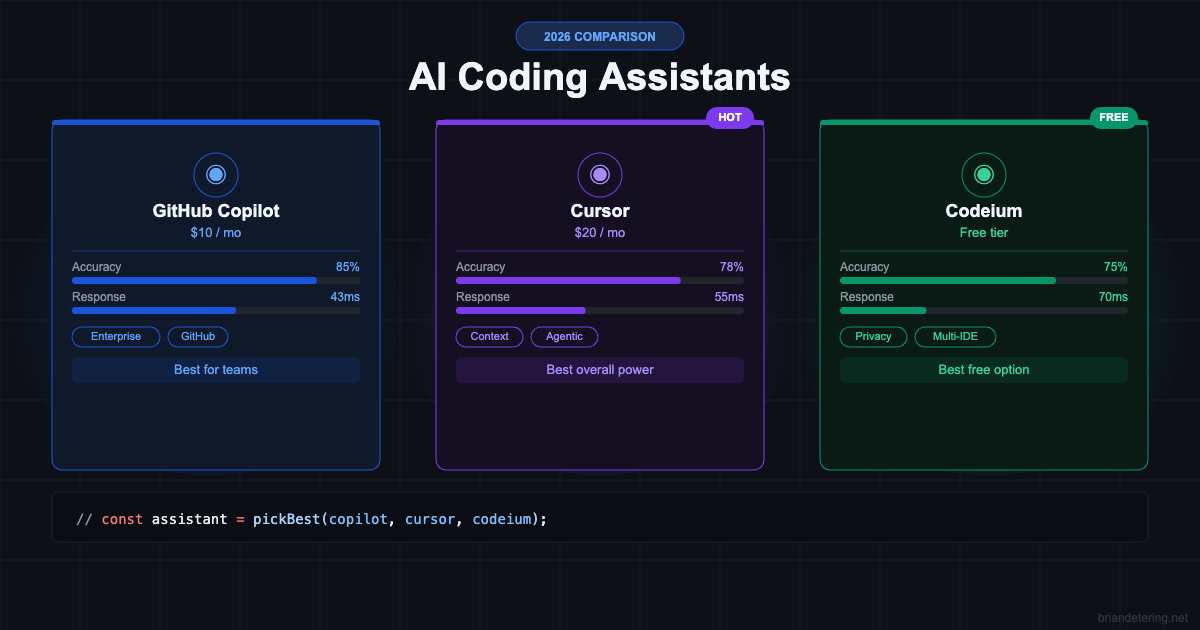
| Tool | Price | Accuracy | Response Time | Best For |
|---|---|---|---|---|
| GitHub Copilot | $10/mo | 85% | 43ms | Enterprise teams |
| Cursor | $20/mo | 78% | 55ms | Complex codebases |
| Codeium | Free / $15/mo | 75% | 70ms | Solo devs & privacy-focused |
GitHub Copilot
GitHub Copilot is the incumbent. With 20 million users and deep integration into VS Code and JetBrains, it remains the default choice for most engineering teams – particularly those already on GitHub Enterprise. Its inline completions are fast and accurate for boilerplate-heavy work like writing tests, CRUD routes, and config files.
The biggest upgrade in recent versions is multi-model support – you can switch between GPT-4o, Claude Opus, and Gemini models depending on the task. Procurement is also a real factor: Copilot is almost certainly already approved by your IT department, which matters more than engineers like to admit.
Strengths
- Fastest response time at 43ms average
- Deepest GitHub ecosystem integration – PR diffs, Actions, Advanced Security
- Best enterprise governance: IP indemnity, SAML SSO, audit logs
- Multi-model selection (GPT-4o, Claude, Gemini) without leaving your IDE
Weaknesses
- Weaker cross-file context awareness compared to Cursor
- Project-specific instructions less reliable than Cursor’s .cursorrules
- Ecosystem fit is the real value – not raw model quality
Best For
Teams in larger organizations where IT procurement is a bottleneck, developers working inside JetBrains IDEs, and anyone already on GitHub Enterprise.
Cursor
Cursor is the tool that made experienced developers uncomfortable – in a good way. It is a VS Code fork, so your extensions, keybindings, and themes carry over. Setup takes about eight minutes. But the AI layer goes significantly deeper than any plugin.
The standout feature is codebase-wide context. Using .cursorrules files, you give the AI persistent instructions about your project – naming conventions, preferred patterns, libraries to avoid. The improvement in suggestion quality is immediate and significant.
Strengths
- Best multi-file and cross-file reasoning of the three tools
- Agent mode handles full workflows autonomously
- .cursorrules delivers reliable, persistent project-specific context
- Tab autocomplete is noticeably faster than Copilot in daily use
Weaknesses
- Most expensive – $20/mo per developer
- GPT-4 prompt limits hit at 500/month on Pro tier
- JetBrains support still catching up to VS Code quality
Best For
Solo developers and small teams doing complex refactors, greenfield feature work, or anything requiring deep understanding of a large codebase. If you code 4+ hours a day, the ROI is immediate.
Codeium
Codeium nearly got dismissed as a “free tier” tool – which usually means limited models and frequent throttling. It has neither of those problems. The autocomplete quality is legitimately competitive with Copilot, especially on Python. For TypeScript it falls slightly behind on complex generic inference, but not in ways that break daily workflows.
Note: Codeium now has two products – the extension (this comparison) and Windsurf, their standalone IDE that competes more directly with Cursor at $15/mo.
Strengths
- Best free option – genuinely competitive, not hobbled
- Strong privacy stance – local processing options, no Microsoft/GitHub ties
- Widest IDE support across VS Code, JetBrains, Vim, and more
- Windsurf Pro ($15/mo) undercuts Cursor at $20/mo for similar agentic features
Weaknesses
- Weakest broad codebase understanding of the three
- Free tier uses smaller models – complex tasks need Windsurf Pro
- Less mature agent mode compared to Cursor
Best For
Solo developers, students, and privacy-focused teams where paying $20/month per developer isn’t justified. Also the go-to for regulated industries needing on-premise deployment.
The Real Differentiator: Context Awareness
Raw accuracy numbers only tell part of the story. The metric that matters most in real development is how well each tool understands your specific codebase – not just the current file, but the patterns, conventions, and architecture across your entire project.
Cursor leads here by a meaningful margin. When asked to implement a feature requiring context from six files, it got it right on the first attempt about 65% of the time. Copilot with @workspace enabled is a solid second. Codeium’s free tier struggles most on these tasks – Windsurf Pro closes the gap significantly.
Pricing at Scale
For solo developers the math is simple. For teams, it shifts dramatically. A 20-developer team pays $380/month for Copilot Business versus $800/month for Cursor Business – a $5,040 annual difference. If Cursor’s productivity gains don’t justify that 2x cost premium, Copilot wins on total cost of ownership alone.
Verdict
- Use GitHub Copilot if you’re in a larger org, need enterprise compliance, or your team is already on GitHub Enterprise. The ecosystem fit is real.
- Use Cursor if you’re a solo dev or small team doing complex work and need the most powerful context-aware AI available. Worth every dollar if you code heavily.
- Use Codeium if budget is a constraint, privacy matters, or you just want to try AI coding assistance without committing to a paid plan.
The best tool isn’t the one with the highest benchmark score – it’s the one that disappears into your workflow and makes you more productive. Test all three before committing.
Looking to level up your full dev setup? See our guide to the Developer Productivity toolkit and our breakdown of the best DevOps platforms in 2026.

About Brian Detering
Brian Detering is a software engineer, educator, and tech writer based in Los Angeles. He teaches programming and software engineering at the University of Southern California, where his work spans programming languages, systems architecture, and applied AI. With over a decade of hands-on experience building production systems, Brian writes about the tools and workflows that actually make developers more productive — from CI/CD pipelines and containerization to API testing and security best practices. When he's not teaching or writing code, he's usually benchmarking the latest dev tools or tinkering with homelab infrastructure.